MachineMotion 2 One-Drive connection with UR10e

I've setup our UR10e onto our linear rail but I cannot get communications working between the controller and the UR10e.
I've followed the guide for setting up as per: https://vention.io/resources/guides/setup-ur-in-machinelogic-434 - albeit we don't have the Vention HMI.
The safety resets on both sides and via a laptop connected to the ethernet port of the controller, I can manually jog the linear rail, move to home and move to end.
But, in the controller configuration, it says the robot has disconnected.
The setup guide also shows the "External Control" UR Cap, but we have "MachineLogic For Universal Robots" UR Cap installed. Not sure then if I'm missing anything out here?
UR10e network Settings
IP: 192.168.5.10
SN: 255.255.255.0
DG: 192.168.5.1 (Also tried without default gateway settings)
Remote Control: Enabled
Vention network settings
LAN1 IP: 192.168.5.3 (Static)
LAN1 SN: 255.255.255.0
LAN2: Set to dynamic
Gateway: 192.168.5.1
What am I missing here?
-

Hello! Are you looking to control the UR with our URCap and program in the UR's HMI/Polyscope or with MachineLogic directly in the MachineMotion controller?
It seems like you may be needing the URCap guide instead: https://vention.io/resources/guides/urcapv3-machinelogic-for-universal-robots-mmv2-388
Also if connecting through the Vention Robot safety module, it's dedicated Ethernet cable has a fixed IP address connection on the MachineMotion of 192.168.5.2, so on the UR something like the following would work: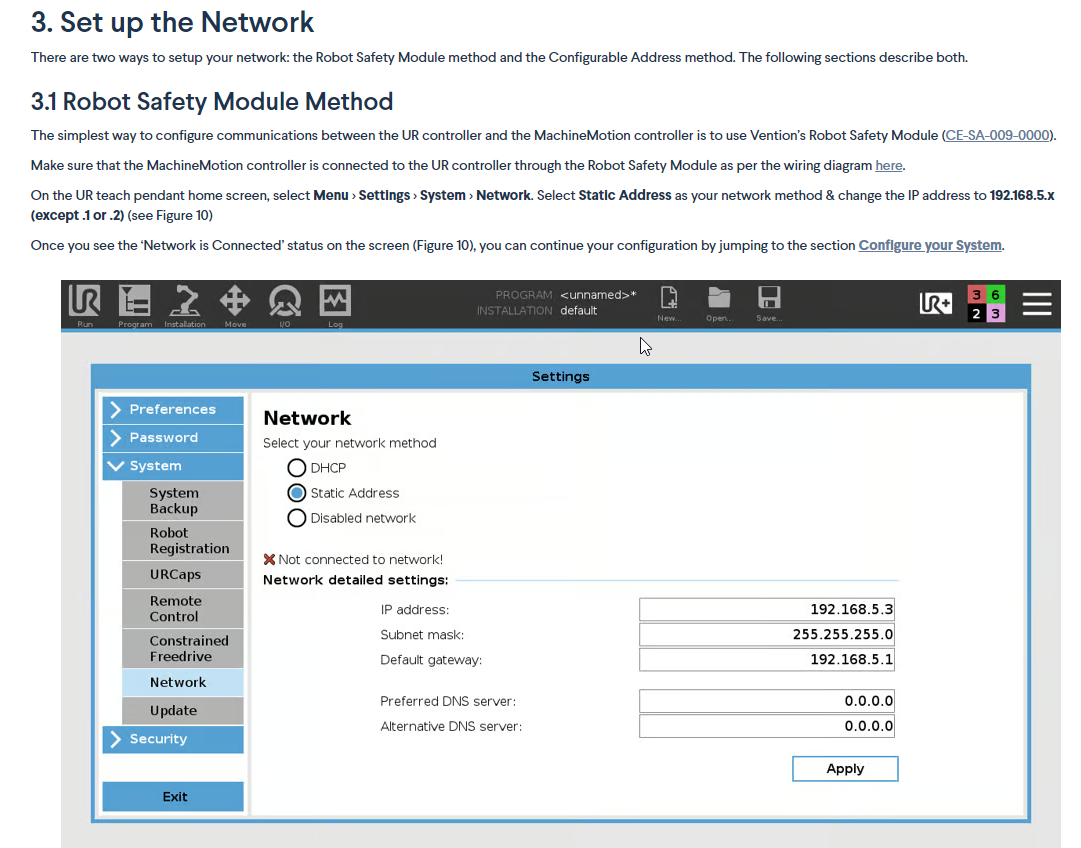
Lastly, to double check the connections (through Vention's RSM) the following doc can be referenced: https://vention.io/resources/guides/robot-safety-module-user-manual-312
1 -
This looks like the guide I need! Thank you. I was following a guide that was similar, but obviously the wrong one.
Let me see how I get on with this one next week.
0
Please sign in to leave a comment.
Comments
2 comments